Swarm
Containers Everywhere = New Problems
- How do we automate container lifecycle?
- How can we easily scale out/in/up/down?
- How can we ensure our containers are recreated if they fail?
- How can we replace containers without downtime (blue/green deploy)?
- How can we control/track where containers get started?
- How can we create cross-node virtual networks?
- How can we ensure only trusted servers run our containers?
- How can we store secrets, keys, passwords and get them to the right container (and only that container)?
Swarm Mode: Built-In Orchestration
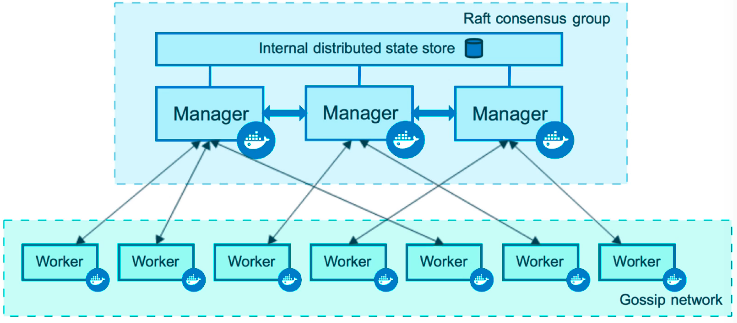
- Swarm Mode is a clustering solution built inside Docker
- Not related to Swarm "classic" for pre-1.12 versions
- Added in 1.12 (Summer 2016) via SwarmKit toolkit
- Enhanced in 1.13 (Jan 2017) via Stacks and Secrets
-
Not enabled by default, new commands once enabled
- docker swarm
- docker node
- docker service
- docker stack
- docker secret
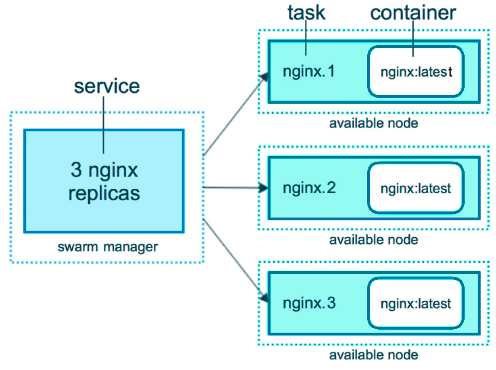
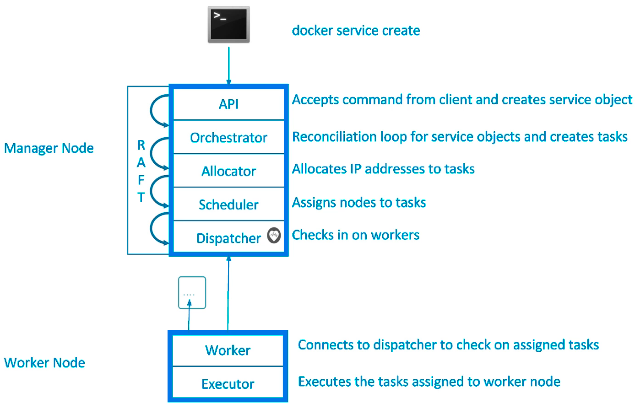
Swarm Services
docker swarm init
-
Lots of PKI and security automation
- Root Signing Certificate create for our Swarm
- Certificate is issued for first Manager node
- Join tokens are created
-
Raft database created to store root CA, configs and secrets
- Encrypted by default on disk (1.13+)
- No need for another key/value system to hold orchestration/secrets
- Replicates logs amongst Managers via mutual TLS in "contrl plane"
Overlay Multi-Host Networking
- Just choose
--driver overlaywhen creating network
- FOr container-to-container traffic inside a single Swarm
- Optional IPSec (AES) encryption on netowrk creation
-
Each service can be connected to multiple networks
- (e.g. fornt-end, back-end)
docker network create --driver overlay mydrupal
docker service create --name psql --network mydrupal -e POSTGRES_PASSWORD=mypass postgres
docker service create --name dripal --network mydrupal -p 80:80 drupal
Routing Mesh
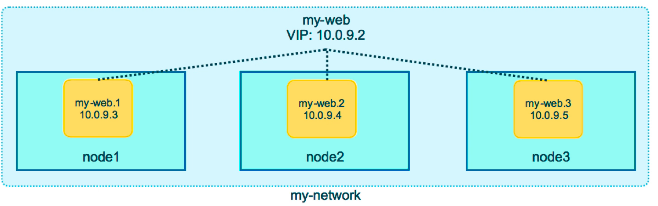
- Routes ingress (incoming) packets for a Service to proper Task
- Spans all nodes in Swarm
- Uses IPVS from Linux Kernal
- Load balances Swarm Services accross their Tasks
- Two ways this works
- COntainer-to-container in a Overlay netrwokr (uses VIP)
- External traffic incoming to published ports (all nodes listen)
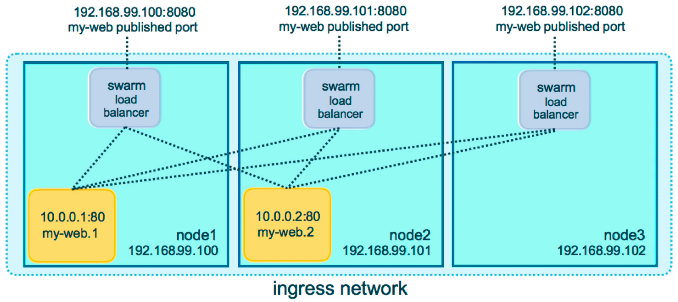
docker service create --name elasticsearch --replicas 3 -p 9200:9200 elasticsearch:2- This is a stateless load balancer
- This LB is at OSI layer 3 (TCP) not layer 4 (DNS)
- Both limitations can be overcome with:
- Nginx or HAProxy LB proxy or:
- Docker enterprise Edition which comes with built-in L4 web proxy
Swarm Stacks
- In 1.13 Docker adds a new layer of abstraction to Swarm called Stacks
- Stacks accept Compose files as their declarative definition for services, networks, and volumes
- We use
docker stack deployrather than docker service create - Stack manages all those objects for us, including overlay network per stack. Adds stack name to start of their name
- New
deploy:key in Compose file. Cant dobuild: - Compose now ignores
deploy:, Swarm ignoresbuild: docker-composecli not needed on Swarm server
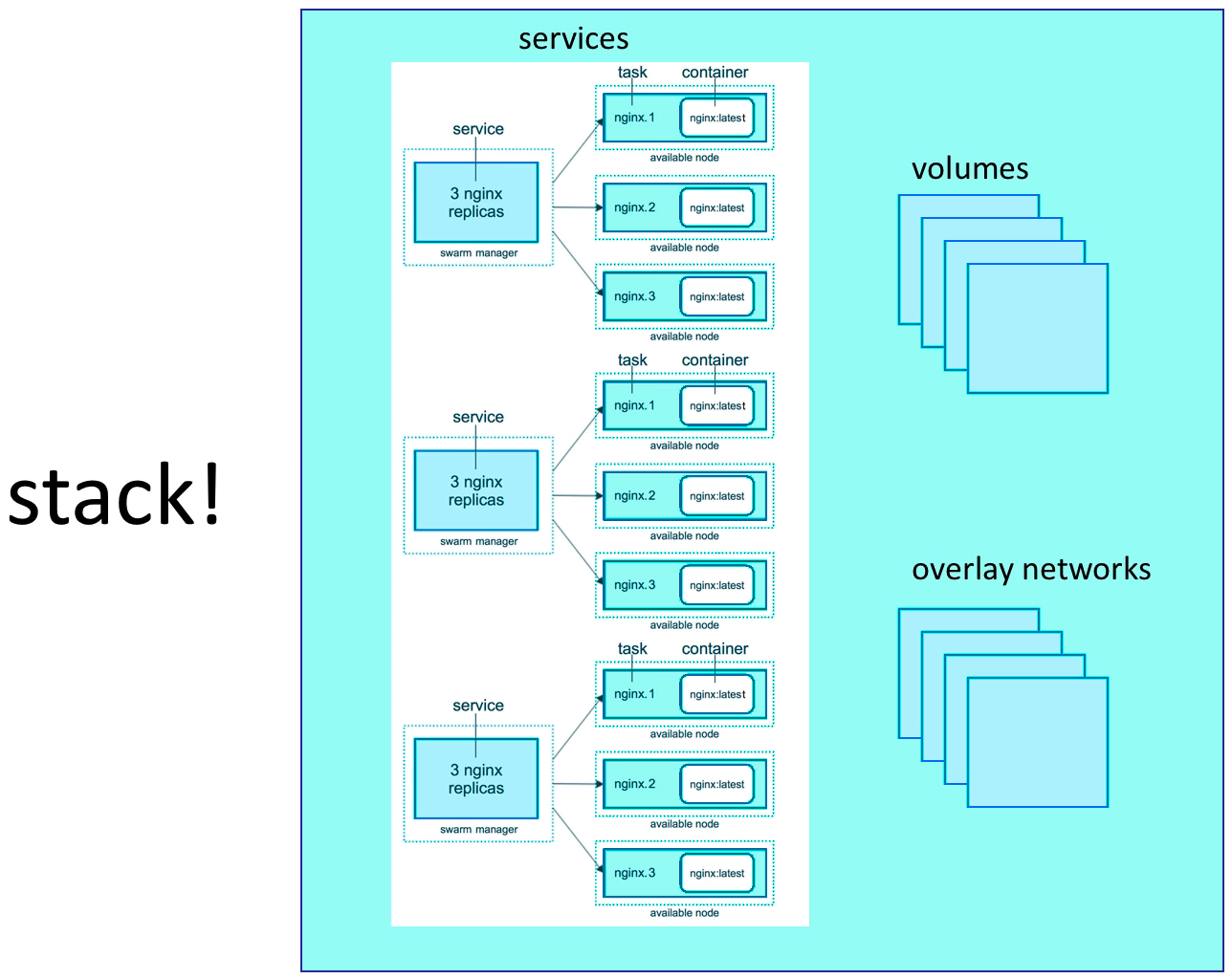
docker stack deploy -c example-voting-app-stack.yml voteappdocker stack serices voteappdocker stack ps voteapp
Swarm Secrets
Secrets Storage
- Easiest "Secure" solution for storing secrets in Swarm
-
What is a Secret?
- Usernames and passwords
- TLS certificates and keys
- SSH keys
- Any data you would prefer not being on front page of news
- Supports generic strings or binary content up to 500Kb in size
- Doesnt require apps to be rewritten
- As of Docker 1.13.0 Swarm Raft DB is encrypted on disk
- Only stored on disk on Manager nodes
- Default is Managers and Workers "control plan" is TLS + Mutual Auth
- Secrets are firt stored in Swarm, then assigned to a Service(s)
- Only containers in assigned Service(s) can see them
- They look like files in container but are actuallin in-memory fs
/run/secrets/secret_nameor/run/secrets/secret_alias
- Local docker-compose can use file-based secrets, but not secure
Secrets with Services
docker secret create psql_user psql_user.txtecho "myDBPassword" \| docker secret create psql_pass -docker secret lsdocker secret inspect psql_userdocker service create --name psql --secret psql_user --secret psql_pass -e POSTGRES_PASSWORD_FILE=/run/secrets/psql_pass -e POSTGRES_USER_FILE=/run/secrets/psql_user postgresdocker service update --secret-rm
Secrets with Stacks
docker service create --name search --replicas 3 -p 9200:9200 elasticsearch:2docker stack deploy -c docker-compoes.yml mydb
Swarm Lifecycle
docker-compose exec psql cat /run/secrets/psql_user
Full App Lifecycle with Compose
- Single set of Compose files for:
- Local
docker-compose updevelopment environemnt - Remote
docker-compose upCI environment - Remote
docker stack deployproduction environment - Note:
docker-compose -f a.yml -f b.yml configmostly works - Note: Compose
extends:doesnt work yet in Stacks
Service Updates
- Provides rolling replacement of tasks/containers in a service
- Limits downtime (be careful with "prevents" downtime)
- Will replace containers for most changes
- Has many, many cli options to control the update
- Create options will usally change, adding -add or -rm to them
-
Also has scale & rollback subcommand for quicker access
docker service scale web=4anddocker service rollback web
- A stack deploy, when pre-existing, will issue service updates
Swarm Update Examples
-
Just update the image used to a newer version
docker service update --image myapp:1.2.1 <servicename>
-
Adding an environment variable and remove a port
docker service update --env-add NODE_ENV=production --publish-rm 8080
Change number of replicas of two services
docker service scale web=8 api=6
Swarm Updates in Stack FIles
Same command, just edit the YAML file, then
docker stack deploy -c file.yml <stackname>
Healthchecks
HEALTHCHECKwas added in 1.12
- Supported in Dckerfile, Compose YAML, docker run, and Swarm Services
-
Docker engine will
exec's the command in the container- e.g curl localhost
- it expects
exit 0(OK) orexit 1(Error)
- Three container states: starting, healthy, unhealthy
- Much better than "is binary still running?"
- Not an external monitoring replacement
- Healthcheck status shows up in
docker container ls
- Check last 5 healthchecks with
docker container inspect
- Docker run does nothing with healthchecks
- Services will replace takss if they fail healthcheck
- Service updates wait for them before continuing
Healthcheck DOcker Run Example
docker run \
--health-cmd="curl -f localhost:9200/_cluster/health || False" \
--health-interval=5s \
--health-retries=3 \
--health-timeout=2s \
--health-start-period=15s \
elasticsearch:2
Healthcheck Dockerfile Examples
-
Options for healthcheck command
--interval=DURATION (default: 30s)--timeout=DURATION (default: 30s)--start-period=DURATION (default: 0s) (17.09+)--retries=N (default:3)
-
Basic command using default options
HEALTHCHECK curl -f http://localhost/ \|\| false
-
Custom options with the command
HEALTHCHECK --timeout=2s --interval=3s --retries=3 CMD curl -f http://localhost/ \|\| exit 1
Healthcheck in Nginx Dockerfile
- Static website running in Nginx, just test default URL
Healthcheck in PHP Nginx Dockerfile
PHP-FPM running behind Nginx, test the Nginx and FPM status URLs
FROM your-nginx-php-fpm-combo-image

# dont do this if php-fpm is another container
# must enable php-fpm ping/status in pool.ini
# must forward /ping and /status urls from ngix to php-fpom

HEALTHCHECK --interval=5s --timeout=3s \
CMD curl -f http://localhost/ping || exit 1
Healthcheck in postgres Dockerfile
Use a PostgtreSQL utility to test for ready state