Kubernetes Install
Architecture Terminology
-
Kubernetes: the whole orchestration system
- K8s "k-eights" or Kube for short
-
Kubectl: CLI to configure Kubernetes and manage apps
- Using "cube control" official pronunciation
- Node: Single server in the Kubernetes cluster
- Kubelet: Kubernetes agent running on nodes
-
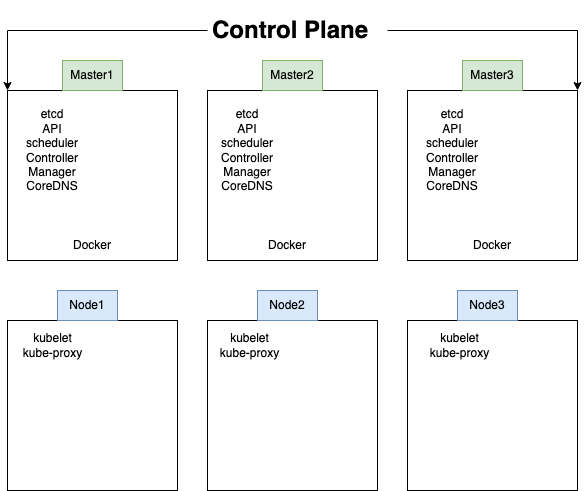
Control Plane: Set of containers that manage the cluster
- Includes API server, scheduler, controller manager, etcd, and more
- Sometimes called the master
Installing Kubernetes
- Kubernetes is a series of containers, CLIs and configurations
- Many ways to install
-
Docker Desktop: Enable in settings
- Sets up everything inside Docker's existing Linux VM
-
Docker Toolbox on Windows: MiniKube
- Uses VirtualBox to make Linux VM
-
Your Own Linux Host or VM: MicroK8s
- Installs Kubernetes right on the OS
-
Kubernetes in a browser
- Try http://play-with-k8s.com or katacoda.com in a browser
Container Abstractions
-
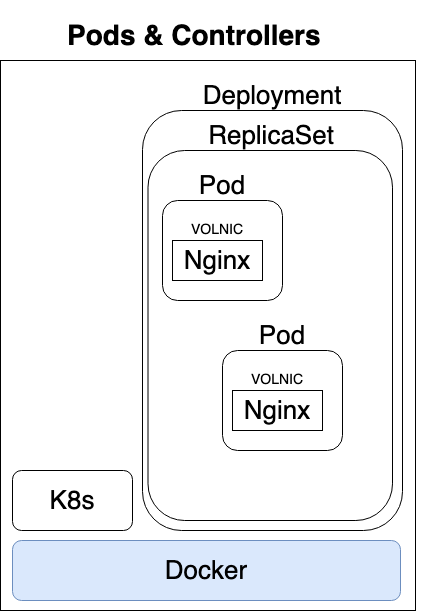
Pod: one or more containers running together on one Node
- Basic unit of deployment. Containers are always in pods
-
Controller: For creating/updating pods and other objects
- Many types of Controllers inc. Deployment, ReplicaSet, StatefulSet, DaemonSet, Job, CronJob, etc.
- Service: network endpoint to connect to a pod
- Namespace: Filtered group of objects in cluster
- Secrets, ConfigMaps, and more
Kubectl Command Styles
- Kubernets is evolving, and so is the CLI
-
We get three ways to create pods from the kubectl CLI
kubectl run(changing to be only for pod creation)kubectl create(create some resources via CLI or YAML)kubectl apply(create/update anything via YAML)
Our First Pod
Creating Pods with kubectl
-
Are we working?
kubectl version
- Two ways to deploy Pods (containers): via commands, or via YAML
-
Lets run a pod of the nginx web server!
kubectl run my-nginx --image nginx
-
Lets list the pod
kubectl get pods
-
Lets see all objects
kubectl get all
Pods -> ReplicaSet -> Deployment
Cleanup
-
Delete deployment
kubectl delete deployment my-nginx
Scaling ReplicaSets
-
Start a new deployment for one replica/pod
kubectl run my-apache --image httpd
-
Lets scale it up with another pod
kubectl scale deploy/my-apache --replicas 2kubectl scale deployment my-apace --replicas 2- Same command
- deploy = deployment = deployments
Inspecting Deployments
kubectl get pods
-
Get container logs
kubectl logs deploy my-apache --follow --tail 1
-
Get a bunch of details about an object including events!
kubectl logs -l run=my-apachekubectl describe pod/my-apache-xxxxxx-yyyyy
-
Watch a command (without needing
watch)kubectl get pods -w
-
In a seperate window
kubectl delete pod/my-apache-xxx-yyy
- Watch the pod get re-created