EIGRP
Concepts and Planning
Why You Would Choose to Use EIGRP
- Backup routes (Fast convergence / DUAL)
- Simple configuration
- Flexibility in summarization
- Unequal cost load-balancing
- combines best of distance vector and link state
EIGRP Tables and Terminology
A router running EIGRP maintains three tables:
- Neighbour table
- Topology table (Successor routes, Feasible successor)
- Routing table
A router running EIGRP has different terms:
- Feasible Distance (FD)
- Distance from you to reach a specific route
- Advertised Distance (AD)
- Distance from your neighbour to reach a specific route
- Successor
- Feasible Successor
- Active Route (Bad - actively looking for a backup)
- Passive Route (Good)
Note
To be considered a feasible successor, the AD must be less than the FD of the successor.
EIGRP Neighbour Relationships
- Hello: forms relationship
- Update: sends updates
- Query: asks about routes
- Reply: response to a query
- Ack: acknowledges the update, query and reply messages
- 224.0.0.10
EIGRP Metric Calculation
- Bandwidth (K1)
- Delay (K3)
- Reliability (K4 and K5)
- Loading (K2)
- MTU
\[Metric = [(K1*BW+\frac{K2*BW}{256-load}+K3*delay)*\frac{K5}{K4+reliability}]\]
\[Real (default) Metric = [256*(slowestBW+AllLinkDelays)]\]
\[BW = \frac{10^7}{BW}\]
\[Delay = DelayInMicroseconds\]
Basic Configuration
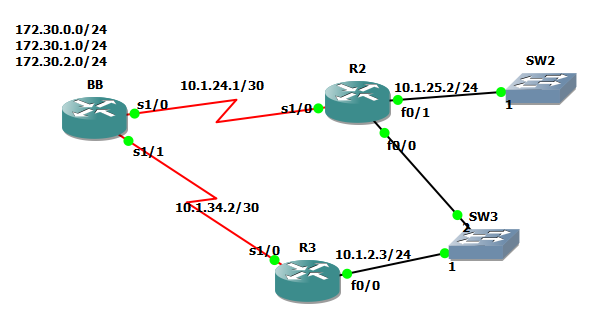
BB Router
BB#conf t
BB(config)#int s1/0
BB(config-if)#ip add 10.1.24.1 255.255.255.252
BB(config-if)#band 256
BB(config-if)#no shut
BB(config-if)#int s1/1
BB(config-if)#ip add 10.1.34.1 255.255.255.252
BB(config-if)#band 128
BB(config-if)#no shut
BB(config-if)#int lo1
BB(config-if)#ip add 172.30.0.1 255.255.255.0
BB(config-if)#int lo2
BB(config-if)#ip add 172.30.1.1 255.255.255.0
BB(config-if)#int lo3
BB(config-if)#ip add 172.30.2.1 255.255.255.0
BB(config)#router eigrp 90
BB(config-router)#passive-interface default
BB(config-router)#no passive-interface s1/0
BB(config-router)#no passive-interface s1/1
BB(config-router)#variance 2
BB(config-router)#network 10.1.2.1 0.0.0.0
BB(config-router)#network 10.1.24.1 0.0.0.0
BB(config-router)#network 10.1.34.1 0.0.0.0
BB(config-router)#network 172.30.0.0 0.0.3.255
BB(config-router)#network 192.168.1.0 0.0.0.255
BB(config-router)#no auto-summary
BB(config)#ip route 192.168.1.0 255.255.255.0 null0
BB(config)#ip default-network 192.168.1.0
BB#wr
R2 Router
R2#conf t
R2(config)#int s1/0
R2(config-if)#ip add 10.1.24.2 255.255.255.252
R2(config-if)#band 256
R2(config-if)#no shut
R2(config-if)#int f0/0
R2(config-if)#ip add 10.1.2.2 255.255.255.0
R2(config-if)#no shut
R2(config-if)#int f0/1
R2(config-if)#ip add 10.1.25.2 255.255.255.0
R2(config-if)#no shut
R2(config-if)#router eigrp 90
R2(config-router)#passive-interface f0/1
R2(config-router)#network 10.1.2.2 0.0.0.0
R2(config-router)#network 10.1.24.2 0.0.0.0
R2(config-router)#no auto-summary
R2#wr
R3 Router
R3#conf t
R3(config)#int s1/0
R3(config-if)#ip add 10.1.34.2 255.255.255.252
R3(config-if)#band 128
R3(config-if)#no shut
R3(config-if)#int f0/0
R3(config-if)#ip add 10.1.2.3 255.255.255.0
R3(config-if)#no shut
R3(config-if)#router eigrp 90
R3(config-router)#network 10.1.2.3 0.0.0.0
R3(config-router)#network 10.1.34.2 0.0.0.0
R3(config-router)#no auto
R3#wr
Advanced Configuration
Frame Relay PVC Design
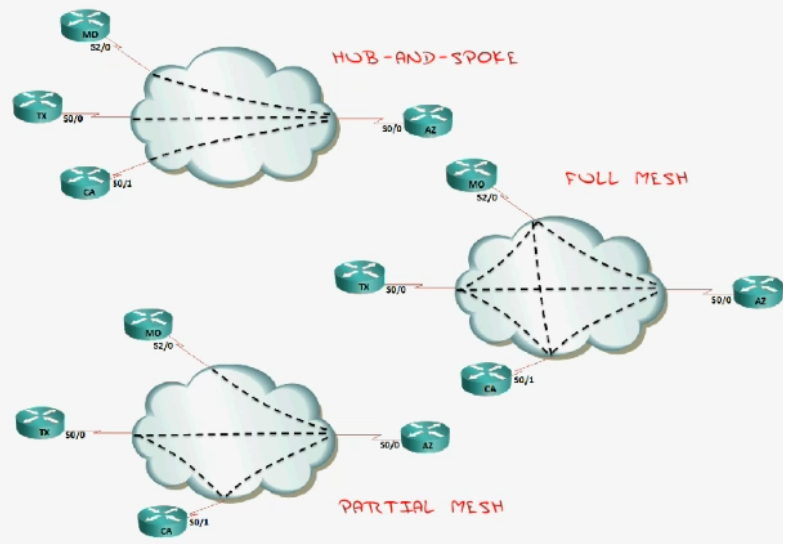
- Hub-and-Spoke
- Inexpensive
- If hub fails, WAN fails
- Full Mesh
- Expensive
- Full redundancy
- Good for VOIP
- Seen in MPLS
- Partial Mesh
- Hybrid
- Not so critical spokes have no redundancy
How EIGRP Handles NBMA (Non Broadcast Multi-Access)
- EIGRP uses "Pseudo-Broadcasts" or manual neighbours (emulated broadcast)
- Split Horizon can be an issue ("I will not tell somebody what they told me")
- Disabled on physical interfaces
- Enabled on sub-interfaces
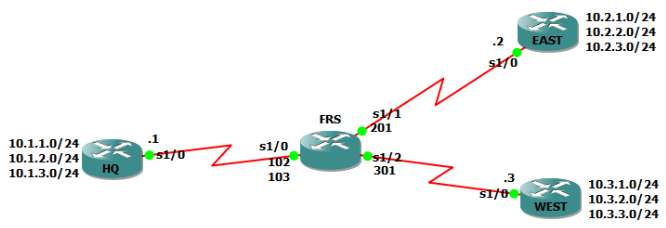
Configuration Example
eigrp-advanced-configuration.zip
Best Practices and Design
Debugging EIGRP packets
Show communication of EIGRP packets:
debug eigrp packets
Query Swarm Resolutions
- Summary routes
- Stub configuration